

Private visual planning · iPhone & iPad
FutureGrid. Plan your next grid.
Arrange your visual profile before you post. Keep photos, carousel drafts, and captions together in a private workspace on your device.
Free with in-app purchases.
Requires iOS / iPadOS 17 or later.
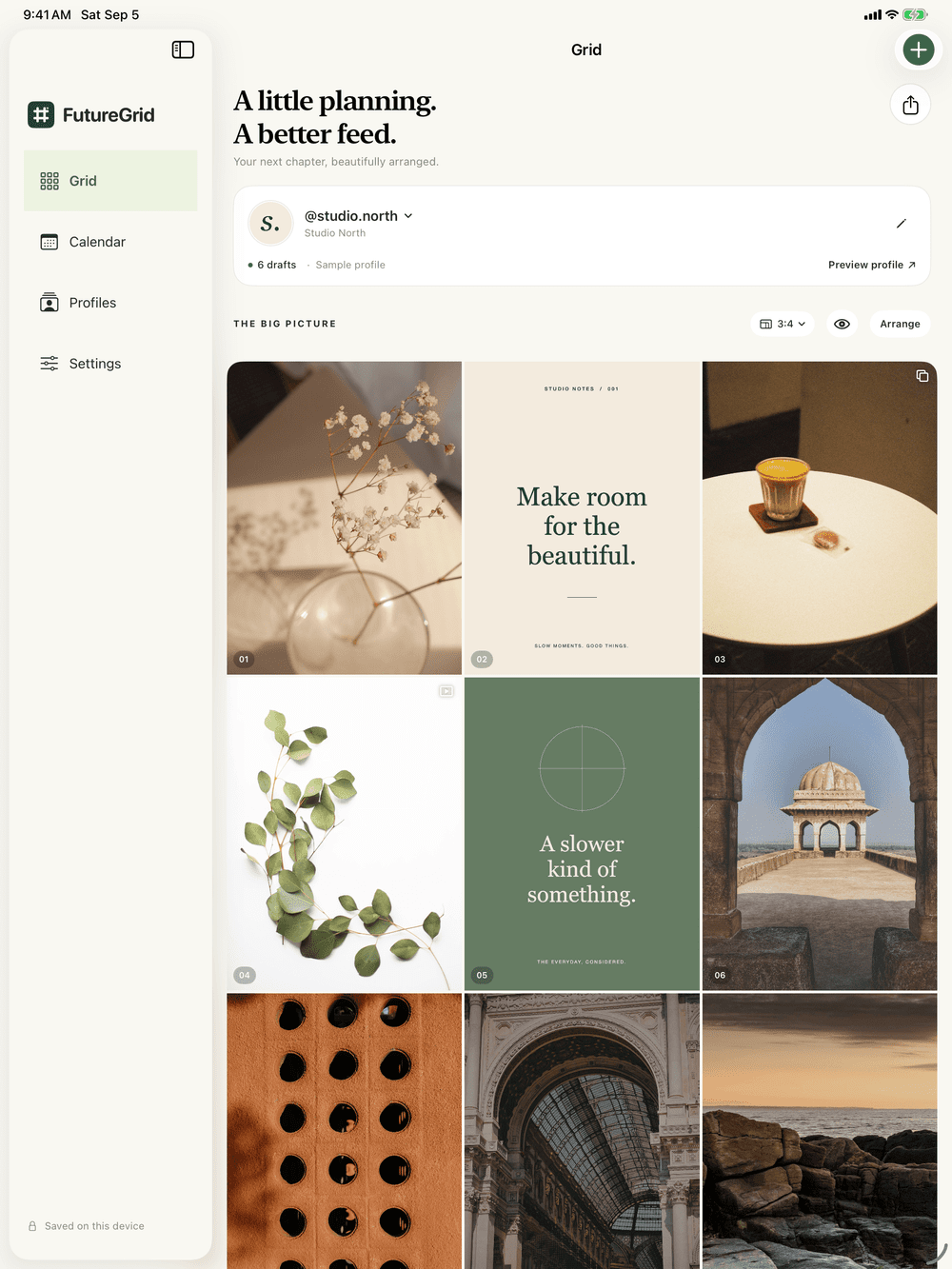
Profile details are simulated.
- No FutureGrid account
- No social-media login
- Your drafts stay on your device
See it together
Give every post a place.
Bring your ideas into one view. Explore the sequence, refine the details, and decide what belongs next.
Arrange your visual profile.
Import images from Photos or Files, drag posts into place, and preview portrait or square grids. Adjust each preview crop without changing the saved planning image.
Keep the whole draft together.
Write captions, plan a carousel with several images, and reorder its slides. Add a local reminder when you want to return to a draft.
Find the right Reel cover.
Choose a photo or select a frame from a video, then see how the still image fits your profile. FutureGrid keeps the selected cover image; it does not edit or publish the video.
Creator, Agency & LifetimeMake client reviews easier.
Prepare image or PDF exports of your profile preview for a client to review. Exports are created on your device, and you choose the sharing destination.
Agency & LifetimeFrom idea to handoff
Plan here. Publish when you are ready.
FutureGrid prepares your draft for a manual handoff. You make the final selection and publish in Instagram.
Bring in your images.
Choose photos or files and add them to a profile.
Arrange and refine.
Move posts, adjust preview crops, and draft your captions.
Prepare the handoff.
Save planning images to Photos, copy the caption, and open Instagram.
Publish yourself.
Select your images and paste the caption in Instagram, then publish there.
You stay in control. Local reminders return you to a draft; they do not publish it. Planning images are optimized copies, so keep your originals for publishing at their original quality.
Choose your workspace
Start free. Make room as you grow.
Try a single profile, then choose the capacity and tools that fit your work. Current regional prices are shown in the app before purchase.
Free
Start without a purchase
- 1 profile
- Up to 12 grid posts
- Caption drafting
- Visual grid planning
Creator
Annual subscription
- Up to 3 profiles
- Unlimited posts
- Caption drafting
- Reel cover planning
Agency
Annual subscription
- Up to 20 profiles
- Unlimited posts
- All Creator features
- Image & PDF client exports
Lifetime
One-time purchase
- Unlimited profiles
- Unlimited posts
- All Agency features
- No annual renewal for this plan
Creator and Agency are auto-renewing annual subscriptions managed through Apple. A Lifetime purchase does not automatically cancel an existing annual subscription; manage any existing subscription separately in your Apple settings.
Private by design
Your planning library stays local.
Profile details, drafts, captions, and planning images are stored on each device. FutureGrid has no account system, requires no social-media login, and does not provide cloud sync between devices.
Standard device backups may include app data according to your Apple settings. Images saved to Photos may sync through iCloud Photos; shared exports follow the destination you choose. Purchases use Apple’s payment system.
A few useful answers
Before you start.
Does FutureGrid post automatically?
No. It can save your planning images to Photos, copy a caption, and open Instagram. You choose the images, paste the caption, and publish in Instagram yourself. Reminders open a draft for review and do not post it.
Do I need an Instagram or FutureGrid account?
You do not need either account to plan in FutureGrid. It does not request your Instagram password or connect to a social account. Publishing in Instagram is a separate step in Instagram.
Do my profiles sync between iPhone and iPad?
No. Each device keeps its own local library. FutureGrid does not provide cloud sync or automatic transfer of profiles, drafts, or images between devices.
Can I plan videos and Reels?
Creator, Agency, and Lifetime include Reel cover planning. Choose a still photo or pick a frame from a video. Only that cover image is kept in the draft; full-video drafts, video editing, and video publishing are not included.
Can I share a preview with a client?
Agency and Lifetime include image and PDF exports of profile previews. You choose when to create an export and where to share it. FutureGrid does not provide shared accounts or a cloud review portal.
How can I get help?
Open Settings → About FutureGrid → Submit feedback in the app, or use the Rule Mobile support button below. Include your device, system version, app version, and a short description of what happened.
Make space for your next idea.
Start free on iPhone and iPad. iOS / iPadOS 17 or later.
