
 TuneDeckSoundboard Support
Rule Mobile support
Help for TuneDeck
TuneDeck helps you trigger colorful sound pads, shape synth-style tones, sequence quick ideas, and record live soundboard performances as WAV files from your iPhone or iPad. This page is here for setup questions, audio playback issues, recording and export help, bug reports, and feedback.
Get Started
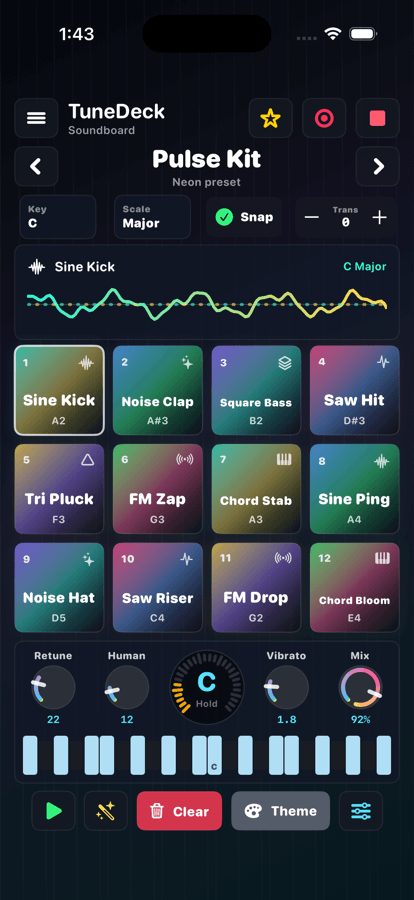
- Choose a preset bank and tap any pad to trigger a sound.
- Use key, scale, snap, transpose, retune, humanize, vibrato, and mix controls to shape playback.
- Press Play to sequence pads automatically, then adjust BPM from the TuneDeck menu.
- Tap Record to capture a live performance, then save the WAV file to Files or discard it.
We Can Help With
- Solving audio playback, volume, Bluetooth, headphones, or speaker issues.
- Understanding pad editing, randomized sounds, themes, presets, and sequencing.
- Saving WAV recordings through the iOS Files export flow.
- Reporting crashes, layout issues, recording problems, or unexpected sound behavior.
Send Useful Details
- Include your iPhone or iPad model and iOS version.
- Include the TuneDeck app version and whether the issue happened during recording.
- Describe your audio output device, such as speakers, wired headphones, or Bluetooth.
- Attach screenshots or a screen recording when the issue is visual.
Recording Note
TuneDeck records the app's generated soundboard output. It is not designed to record microphone audio. Recordings are temporary until you choose to save them to Files, or they are discarded when you choose Discard Recording.
Frequently Asked Questions
What does TuneDeck record?
TuneDeck records the live soundboard output created inside the app, including manual pad taps and sequenced playback. It does not need microphone access for this workflow.
Where are recordings saved?
After you stop recording, TuneDeck asks whether to save or discard. If you choose Save Audio File to Files, iOS lets you pick a destination and saves the recording as a WAV file.
Does TuneDeck require an account or subscription?
No. TuneDeck does not require a login, cloud account, subscription, or external sound account to use the core soundboard features.
Why do I not hear sound?
Check device volume, Silent Mode, Focus settings, the selected audio output, connected Bluetooth devices, and whether another app is controlling audio routing. If the issue continues, email support with your device and iOS version.
Can I import my own custom audio files?
The current version focuses on built-in synth-style sound pads, pad editing, sequencing, and WAV recording. Send feedback if custom sample import is important to your workflow.
Privacy note: Please do not send passwords, payment card numbers, medical information, or sensitive personal information in support emails. Only attach recordings, screenshots, or screen recordings if you are comfortable sharing them with Rule Mobile support.
Still need help?
Contact Rule Mobile
Email us and we will review your question, bug report, recording issue, or feature request.