
How to Correctly Build & Play Melee Akaneia on macOS for Swiss/GameCube
Rule Mobile Retro Guide
Melee Akaneia on macOS for GameCube and Swiss.
Akaneia Build is a Super Smash Bros. Melee mod that keeps the base roster and mechanics intact while adding new fighters, stages, and game modes. This Rule Mobile guide shows the roster first, then walks through a verified macOS path for Swiss and GameCube using your own clean USA v1.02 backup.

This guide assumes you own Super Smash Bros. Melee and made your own personal clean ISO backup.
 Start the macOS build
What Akaneia adds
A bigger Melee roster without losing the Melee feel.
Akaneia keeps the original Super Smash Bros. Melee cast in place, then expands the character select screen with seven additional fighters: Sonic, Diddy Kong, King Dedede, Lucas, Tails, Wolf, and Charizard.
- 33 fighters total when Zelda and Sheik are counted separately.
- 32 roster slots when Zelda and Sheik are counted as one transformation pair.
- New stages and game modes sit on top of the original Melee foundation rather than replacing it.
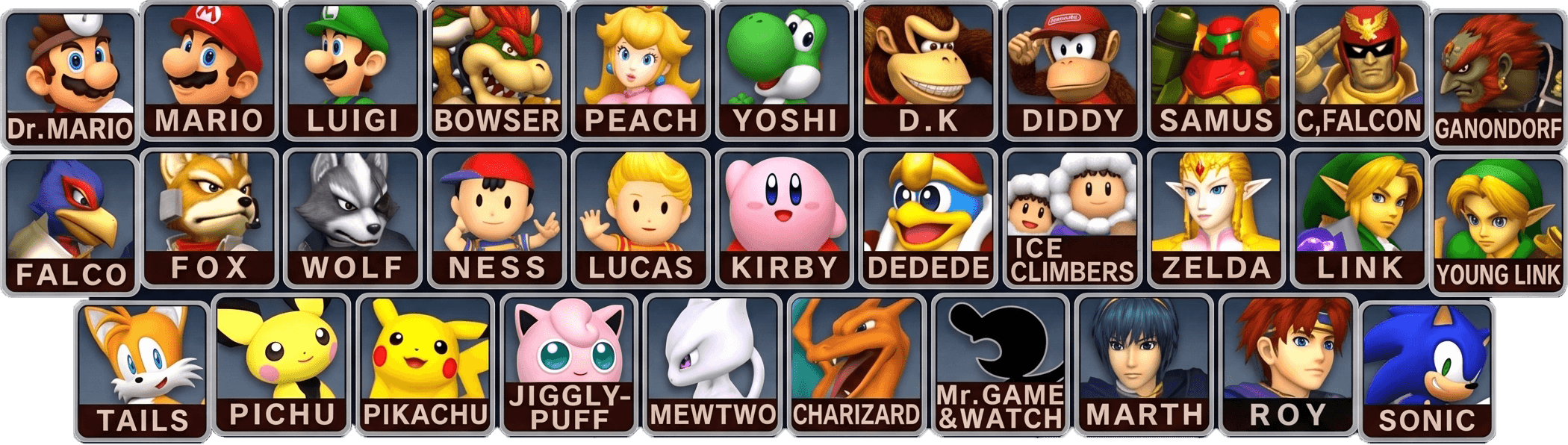
The original 26 Melee fighters
Mario, Luigi, Peach, Bowser, Dr. Mario, Yoshi, Donkey Kong, Captain Falcon, Samus, Link, Zelda, Sheik, Young Link, Ganondorf, Kirby, Fox, Falco, Ness, Ice Climbers, Pichu, Pikachu, Jigglypuff, Mewtwo, Marth, Roy, and Mr. Game & Watch.
The Akaneia newcomers
Sonic, Diddy Kong, King Dedede, Lucas from Mother 3, Tails, Wolf, and Charizard. The appeal is direct: more dream-match energy, more character variety, and a build that still feels centered on Melee.
 Sonic
Sonic
 Diddy Kong
 King Dedede
 Lucas
Lucas
 Tails
Tails
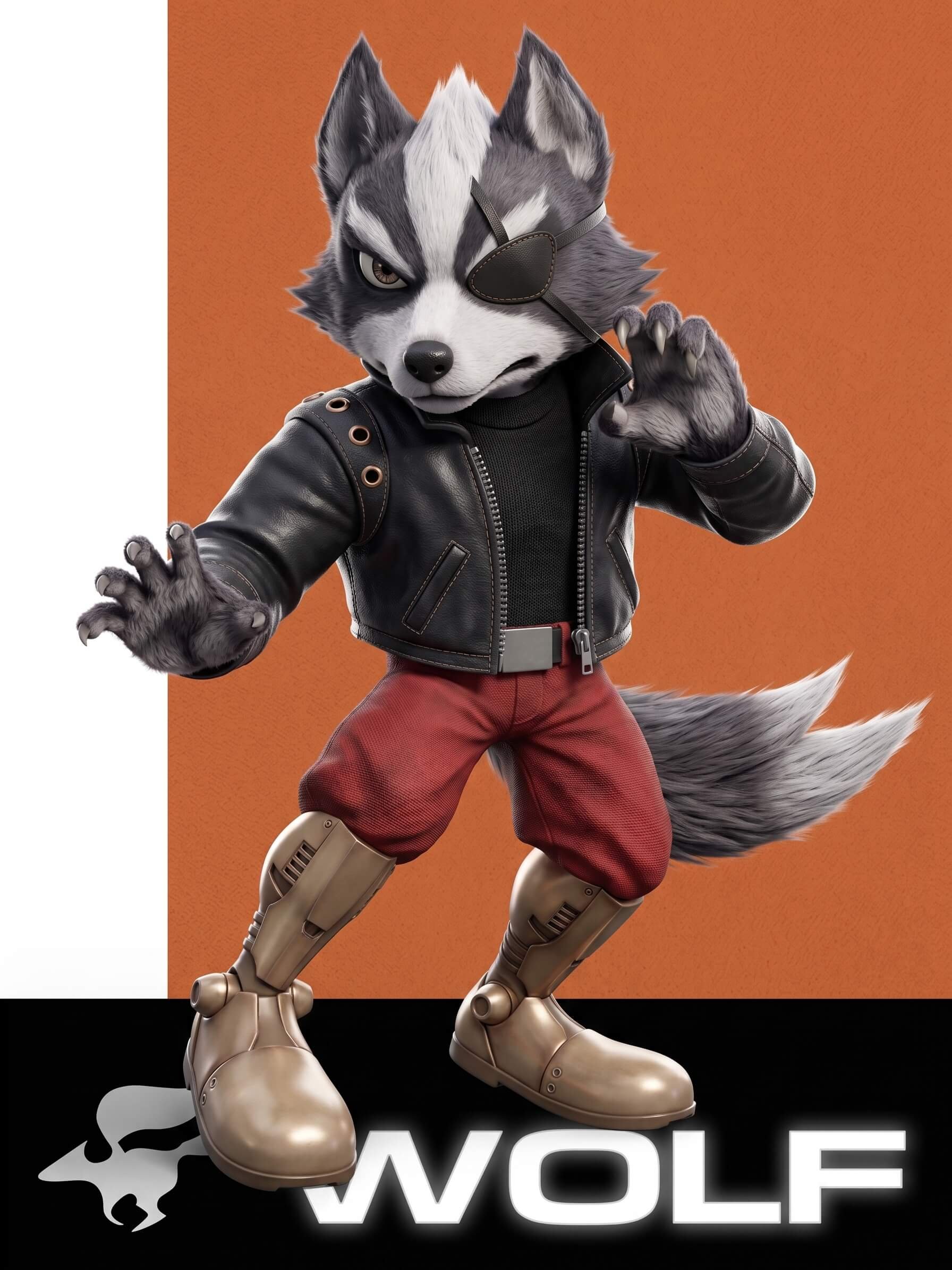 Wolf
Wolf
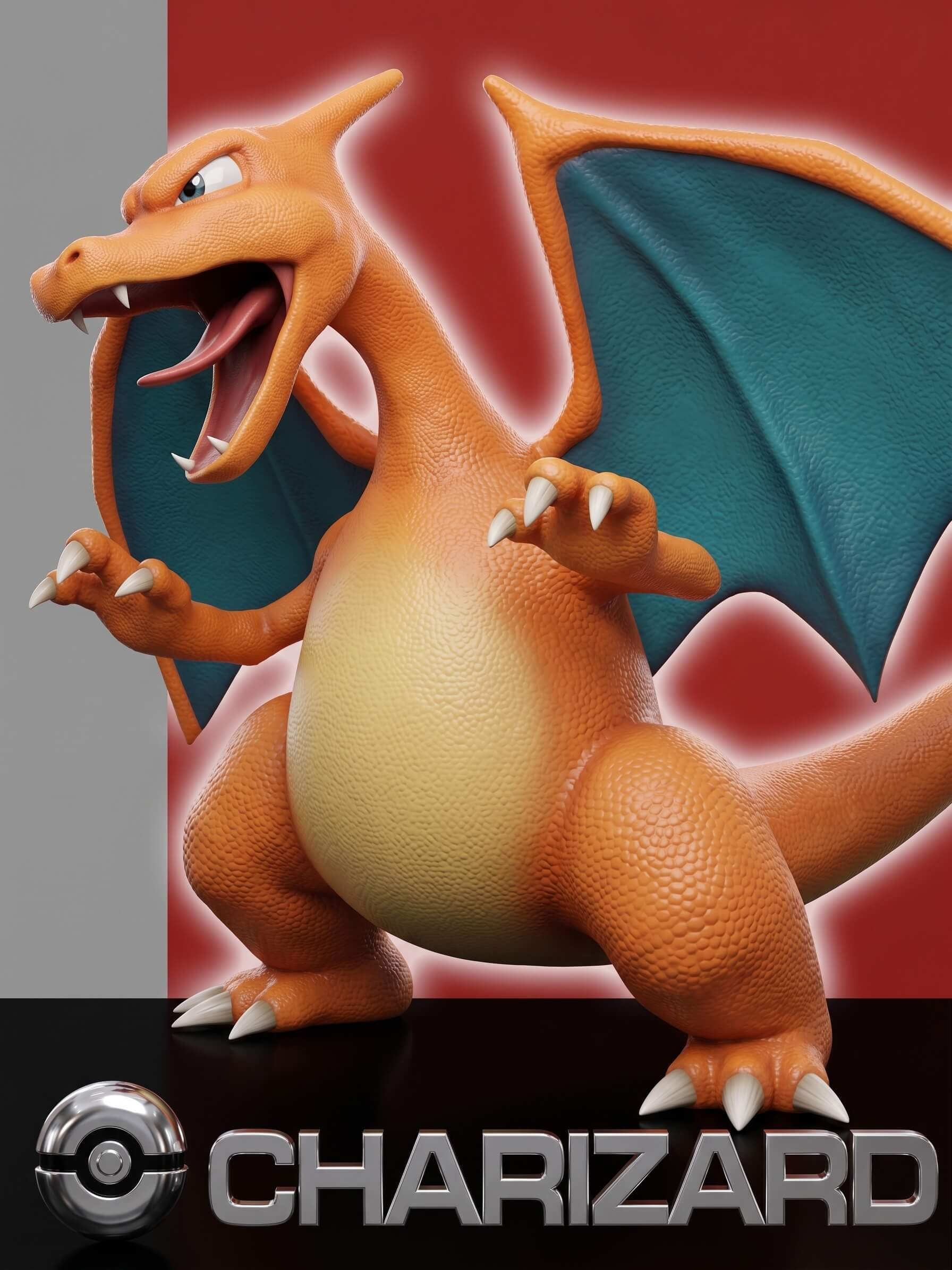 Charizard
Known-good result
Build it, then prove it.
The tested result was Akaneia Build v1.0.1. For the SD card, the cleaner TV-facing filename that worked well in Swiss was Super Smash Bros. Melee - Akaneia.iso.

Real hardware focus
The workflow was written for Swiss on real GameCube hardware, not just emulator testing.

Exact base matters
Use a clean Super Smash Bros. Melee USA v1.02 ISO. Do not patch PAL, Japanese, v1.00, v1.01, NKit, RVZ, CISO, scrubbed, or rebuilt images.
Hash before copying
The final MD5 and SHA1 are the reliable way to confirm the build, even if WIT shows an older internal disc name.

Copy clean to SD
If Swiss reports Failed to read FST!, a clean SD recopy can be the fix when the local ISO hash is already correct.
Known-good output verification
- Final ISO
- Melee_Akaneia.iso
- TV filename
- Super Smash Bros. Melee - Akaneia.iso
- MD5
- 63ea8e113e451c9369f17f7a49012412
- SHA1
- 66eaca53bb33824118345378b32cb56516d0308f
- Game ID
- GALE01
- Size
- 1,459,978,240 bytes
Sources and tools
Use official downloads.
Use the Akaneia release page, WIT, xdelta3, and Swiss together with the hash checks below. That gives you a repeatable v1.0.1 build path before anything touches the SD card.
 Akaneia Build repository
Official project repository for Akaneia Build.
Akaneia releases Akaneia releases
Official release page, including the v1.0.1 builder package.
Builder v1.0.1 Builder v1.0.1
Official Akaneia Builder archive used by this workflow.
Wiimms ISO ToolWIT is used to inspect the GameCube image and confirm identity details.
xdelta3 xdelta3
Akaneia's patch is an xdelta patch. This guide used xdelta3 3.1.0 locally.
Swiss Swiss
Swiss
GameCube homebrew loader used for the real-hardware boot test.
macOS workflow
Easy setup using Terminal and a clean folder.
Separate the base ISO, downloads, extracted patch files, Terminal tools, and final output. That clean folder structure makes the build easier to reproduce and much easier to troubleshoot.
Create the workspace
Put your own clean ISO at $HOME/MeleeAkaneiaBuild/input/Super Smash Bros. Melee v1.02 NTSC-U.iso.
mkdir -p "$HOME/MeleeAkaneiaBuild"/{input,downloads,patches,tools,output}
cd "$HOME/MeleeAkaneiaBuild"Install WIT locally
WIT is the inspection tool. This keeps the guide self-contained without changing your whole Mac setup.
cd "$HOME/MeleeAkaneiaBuild/tools"
curl -L -o wit-v3.05a-r8638-mac.tar.gz \
  "https://wit.wiimm.de/download/wit-v3.05a-r8638-mac.tar.gz"
tar -xzf wit-v3.05a-r8638-mac.tar.gz
export PATH="$HOME/MeleeAkaneiaBuild/tools/wit-v3.05a-r8638-mac/bin:$PATH"
wit versionInstall xdelta3
If you use Homebrew, this is the quickest route. Otherwise, use the official xdelta project links above.
brew install xdelta
xdelta3 -V
The local working build used xdelta3 3.1.0. Any normal working xdelta3 3.x decoder should be fine for applying this patch.
Download and extract the Akaneia Builder
Extract the entire archive, not just the Mac folder. The patch path should resolve to Akaneia Builder/patch.xdelta.
cd "$HOME/MeleeAkaneiaBuild"
curl -L \
  -o "downloads/Akaneia.Builder.1.0.1.7z" \
  "https://github.com/akaneia/akaneia-build/releases/download/1.0.1/Akaneia.Builder.1.0.1.7z"

mkdir -p "patches/Akaneia.Builder.1.0.1"
bsdtar -xf "downloads/Akaneia.Builder.1.0.1.7z" \
  -C "patches/Akaneia.Builder.1.0.1"

find "patches/Akaneia.Builder.1.0.1" -name "patch.xdelta" -print- Expected path
- patches/Akaneia.Builder.1.0.1/Akaneia Builder/patch.xdelta
Verify the clean base ISO
Stop here if the MD5 does not match. The patch is intended for a clean USA Melee v1.02 ISO.
cd "$HOME/MeleeAkaneiaBuild"
md5 -r "input/Super Smash Bros. Melee v1.02 NTSC-U.iso"
shasum -a 1 "input/Super Smash Bros. Melee v1.02 NTSC-U.iso"
wit DUMP "input/Super Smash Bros. Melee v1.02 NTSC-U.iso" | sed -n '1,80p'- Required MD5
- 0e63d4223b01d9aba596259dc155a174
- Required SHA1
- d4e70c064cc714ba8400a849cf299dbd1aa326fc
- Do not patch PAL Melee, Japanese Melee, USA v1.00, USA v1.01, NKit, RVZ, CISO, scrubbed, or rebuilt images.
- Use a normal full ISO and verify the MD5 before patching.
Build the ISO
Use xdelta3 directly. The output file here is intentionally short and easy to verify.
cd "$HOME/MeleeAkaneiaBuild"

BASE="input/Super Smash Bros. Melee v1.02 NTSC-U.iso"
PATCH="patches/Akaneia.Builder.1.0.1/Akaneia Builder/patch.xdelta"
OUT="output/Melee_Akaneia.iso"

xdelta3 -d -f -s "$BASE" "$PATCH" "$OUT"Verify the final output
The release archive and final hash identify this tested image as Akaneia Build v1.0.1. Do not panic if WIT reports the internal disc name as Akaneia 1.0.0.
md5 -r "$OUT"
shasum -a 1 "$OUT"
wit DUMP "$OUT" | sed -n '1,90p'- Expected MD5
- 63ea8e113e451c9369f17f7a49012412
- Expected SHA1
- 66eaca53bb33824118345378b32cb56516d0308f
- WIT essentials
- ISO/GC, disc=GALE01, boot=GALE01, NTSC/USA, Files: 1598
Swiss SD card
The copy step matters.
The first failed hardware attempt showed Failed to read FST!. The patch was valid. The fix was deleting the old SD copy, copying with a temporary name, cleaning macOS sidecar files, and verifying the SD-card MD5.
SD="/Volumes/NO NAME"
ISO="$HOME/MeleeAkaneiaBuild/output/Melee_Akaneia.iso"
NAME="Super Smash Bros. Melee - Akaneia.iso"

rm -f "$SD/$NAME" "$SD/$NAME.copying"
rm -f "$SD/Melee_Akaneia.iso" "$SD/Melee_Akaneia.iso.copying"

cp -X "$ISO" "$SD/$NAME.copying"
sync
mv "$SD/$NAME.copying" "$SD/$NAME"

dot_clean -m "$SD"
find "$SD" -name '._*' -print -delete
sync

md5 -r "$SD/Super Smash Bros. Melee - Akaneia.iso"
shasum -a 1 "$SD/Super Smash Bros. Melee - Akaneia.iso"
diskutil eject "$SD"- The SD copy should match MD5
63ea8e113e451c9369f17f7a49012412. - Keep one clean working file on the SD card:
Super Smash Bros. Melee - Akaneia.iso. - Launch Swiss, browse to the ISO, press
A, and boot normally.
Optional GUI route
MultiPatch can work too.
Akaneia's builder archive includes a Mac GUI route. It is friendlier, but the terminal route is easier to document, repeat, and verify.

GUI inputs
Open MultiPatch from the builder's Mac folder. Choose Akaneia Builder/patch.xdelta, your unmodified USA Melee v1.02 ISO, and an output location.
Still verify
After using the GUI, run md5 -r, shasum -a 1, and wit DUMP. If the output MD5 is not 63ea8e113e451c9369f17f7a49012412, do not copy it to SD.
Mistakes to avoid
Small errors look like big failures.
Most Akaneia build issues come from wrong base images, partial archive extraction, unchecked output hashes, or messy SD-card copies.
Patching the wrong Melee version
Akaneia v1.0.1 requires clean USA Melee v1.02. The correct base MD5 is 0e63d4223b01d9aba596259dc155a174.
Extracting only part of the builder archive
Extract the full .7z archive so the patch path remains Akaneia Builder/patch.xdelta.
Trusting the filename instead of the hash
Melee_Akaneia.iso is just a filename. The final MD5 should be 63ea8e113e451c9369f17f7a49012412.
Treating Failed to read FST! as proof of a bad patch
If the local ISO verifies correctly with WIT and MD5, clean the SD card copy process before rebuilding from scratch.
Leaving duplicate test builds on the SD card
Remove old files like Melee_Akaneia_RECOPY_FIRST.iso and keep one obvious working copy for Swiss.
Copying over an existing ISO in place
Delete the old copy, copy to a temporary .copying filename, sync, rename, clean sidecars, then verify.
Leaving macOS hidden files on the card
Use dot_clean -m "$SD" and delete ._* AppleDouble files so Swiss stays tidy.
Reading the internal disc name as the release version
WIT may show Akaneia 1.0.0. For this build, trust the release package and final v1.0.1 output hash.
Reference links
Keep the trail auditable.
These links support the workflow in this article: the Akaneia repository, official release archive, WIT inspection tool, and Swiss loader used for the final GameCube hardware boot test.

